> ## Documentation Index
> Fetch the complete documentation index at: https://rockboxzig.mintlify.site/llms.txt
> Use this file to discover all available pages before exploring further.
# MPRIS
> Linux media keys and desktop integration via D-Bus.
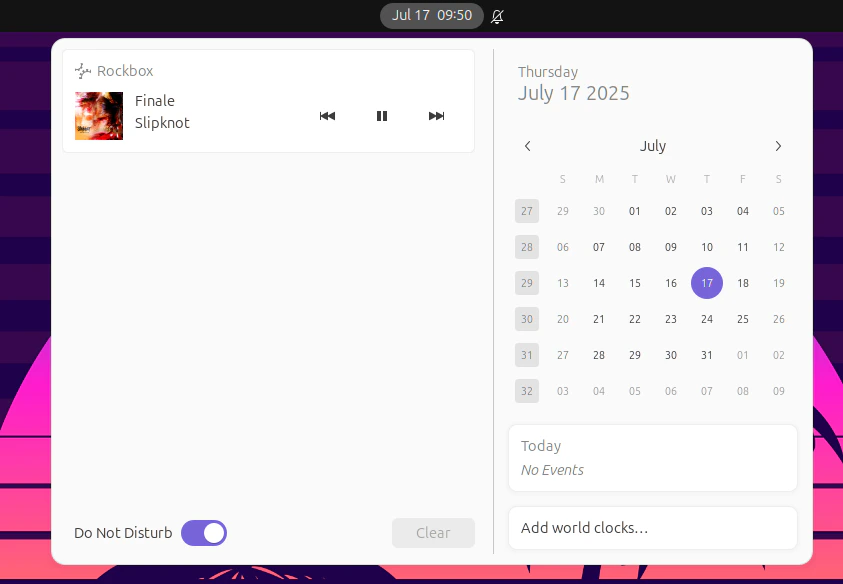
On Linux, `rockboxd` registers itself on the session bus as
`org.mpris.MediaPlayer2.rockbox`. This makes media keys, Now Playing
applets, KDE/GNOME notifications and tools like `playerctl` Just Work.
 ## Capabilities
The MPRIS interface is implemented in `crates/mpris/` and exposes:
* **Player interface** — Play, Pause, PlayPause, Stop, Next, Previous, Seek,
SetPosition, Metadata, PlaybackStatus, LoopStatus, Shuffle, Volume
* **Root interface** — Identity, DesktopEntry, SupportedUriSchemes,
SupportedMimeTypes
* **TrackList interface** — partial (track-level queue introspection)
## Quick test
```sh theme={"theme":{"light":"catppuccin-latte","dark":"min-dark"}}
playerctl --player rockbox play-pause
playerctl --player rockbox metadata
playerctl --player rockbox position 90
```
## Wiring up media keys
GNOME and KDE pick up MPRIS players automatically — no setup needed. For
sway / Hyprland / dwm:
```text theme={"theme":{"light":"catppuccin-latte","dark":"min-dark"}}
# sway
bindsym XF86AudioPlay exec playerctl --player rockbox play-pause
bindsym XF86AudioNext exec playerctl --player rockbox next
bindsym XF86AudioPrev exec playerctl --player rockbox previous
```
## Now Playing applet
GNOME Shell, KDE's Media Player widget, polybar's `mpris-tail`, waybar's
`mpris` module — all consume MPRIS metadata directly.
## macOS
macOS has its own Now Playing system. Rockbox publishes to it through the
`MPNowPlayingInfoCenter` API; you don't need MPRIS on Mac. Media keys work
out of the box.
## Capabilities
The MPRIS interface is implemented in `crates/mpris/` and exposes:
* **Player interface** — Play, Pause, PlayPause, Stop, Next, Previous, Seek,
SetPosition, Metadata, PlaybackStatus, LoopStatus, Shuffle, Volume
* **Root interface** — Identity, DesktopEntry, SupportedUriSchemes,
SupportedMimeTypes
* **TrackList interface** — partial (track-level queue introspection)
## Quick test
```sh theme={"theme":{"light":"catppuccin-latte","dark":"min-dark"}}
playerctl --player rockbox play-pause
playerctl --player rockbox metadata
playerctl --player rockbox position 90
```
## Wiring up media keys
GNOME and KDE pick up MPRIS players automatically — no setup needed. For
sway / Hyprland / dwm:
```text theme={"theme":{"light":"catppuccin-latte","dark":"min-dark"}}
# sway
bindsym XF86AudioPlay exec playerctl --player rockbox play-pause
bindsym XF86AudioNext exec playerctl --player rockbox next
bindsym XF86AudioPrev exec playerctl --player rockbox previous
```
## Now Playing applet
GNOME Shell, KDE's Media Player widget, polybar's `mpris-tail`, waybar's
`mpris` module — all consume MPRIS metadata directly.
## macOS
macOS has its own Now Playing system. Rockbox publishes to it through the
`MPNowPlayingInfoCenter` API; you don't need MPRIS on Mac. Media keys work
out of the box.